It’s amazing how much you can get done in a week when you put your mind to it. I’m pretty tired, and my brain hurts, but this last week has been so much fun!
First things first, I know there’s a lot of talk about vibe coding going around – that’s not what this is. Even though I am using ChatGPT-5 to act as my learning coach and senior AI engineer to guide me, I am breaking everything down step by step and understanding the reasons why I am completing tasks. I’m not just getting hundreds or thousands of lines of code written for me without understanding what they’re doing.
I don’t know whether ChatGPT-5 has the capability to guide me through this project… so I am taking a leap of faith! But my thinking is… if I break the project down into small bitesize pieces and keep ChatGPT aligned to my plan at all times – I should be able to make it through to the finish?
The consultant and delivery specialist in me likes to set out scope and a plan when starting a project, so that was my first task. As mentioned in last week’s post, I want to build an enterprise-ready vertical AI assistant platform. It’s a bit a mouthful I know… but I wanted something that had business relevance and would expose me to a multitude of AI engineering problems. The product will have 4 main capabilities:
- Booking & Diary Management
- Postgres-compatible backend.
- Syncs with Google Calendar.
- Forms the scheduling/operations backbone for the assistant.
- AI Delivery Skills: integrating AI with enterprise systems (Postgres, Google APIs) and demonstrating awareness of workflow automation.
- AI FAQ Bot
- Retrieval-Augmented Generation (RAG) based.
- Includes confidence thresholds and human handoff.
- Handles customer or employee queries with transparency.
- AI Delivery Skills: Hands-on experience with LLM orchestration, RAG pipelines, and confidence thresholds whilst enabling a human-handoff.
- Sentiment Dashboard
- Monitors and tracks user/customer sentiment.
- Links sentiment insights directly to actions (e.g., alerts, workflows).
- Provides leadership with visibility on satisfaction and risk signals.
- AI Delivery Skills: Data analytics and visualisation tied to business actions.
- Forecasting Engine
- Baseline forecasting plus Prophet (time-series forecasting).
- Generates operational recommendations, not just raw predictions.
- Used for planning demand, staffing, or campaign timing.
- AI Delivery Skills: time-series modelling highlights experience with machine learning to deliver operational recommendations, translating AI into business outcomes.
I know from experience that trying to deliver a complete product all at once is not the way to go, and so I created a plan where I would focus on a MVP over the first 2months and then try and deliver the bells and whistles version of the product over months 3 & 4.
Now I have no idea how achievable this is, given I have no coding experience and I will be learning along the way… but I guess that’s why the technical delivery teams (at work) get frustrated every time I ask them to size something they haven’t properly looked into!
Months 1-2: Lean MVP Foundations
Over the initial two months I want to build a lean, credible MVP that demonstrates the core ‘product loop’ (booking CRUD + simple AI FAQ + basic sentiment/forecasting placeholders). To help with this, I set up a project in GitHub and set up a Kanban board to manage all of the individual tasks that I need to complete.
Repository Setup & Structure
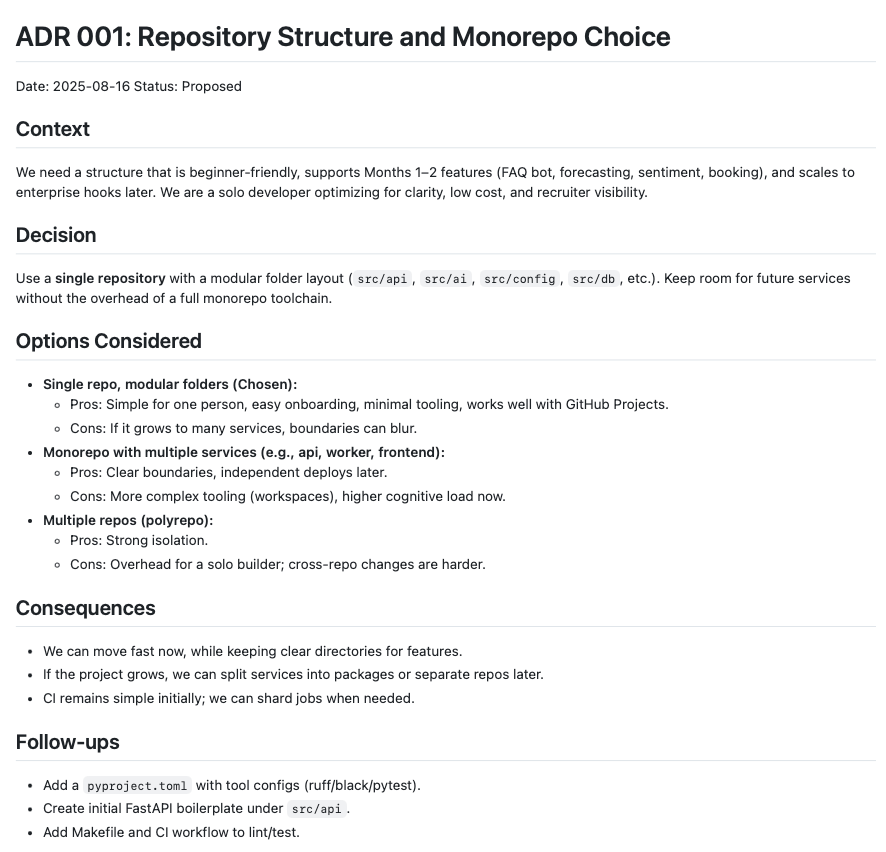
The decision was made to set up a single repository with modular folders as this is simple for solo builder but can also be scaled at a later date. I was also introduced to the concept of Architecture Decision Records (ADRs) throughout this process. It’s best practice to keep a record of the decisions you make as you go through the project so others can see the alternative options that were considered and the reasoning behind the final decision.
Example ADR:
Here’s what I’ve built in my repository so far:
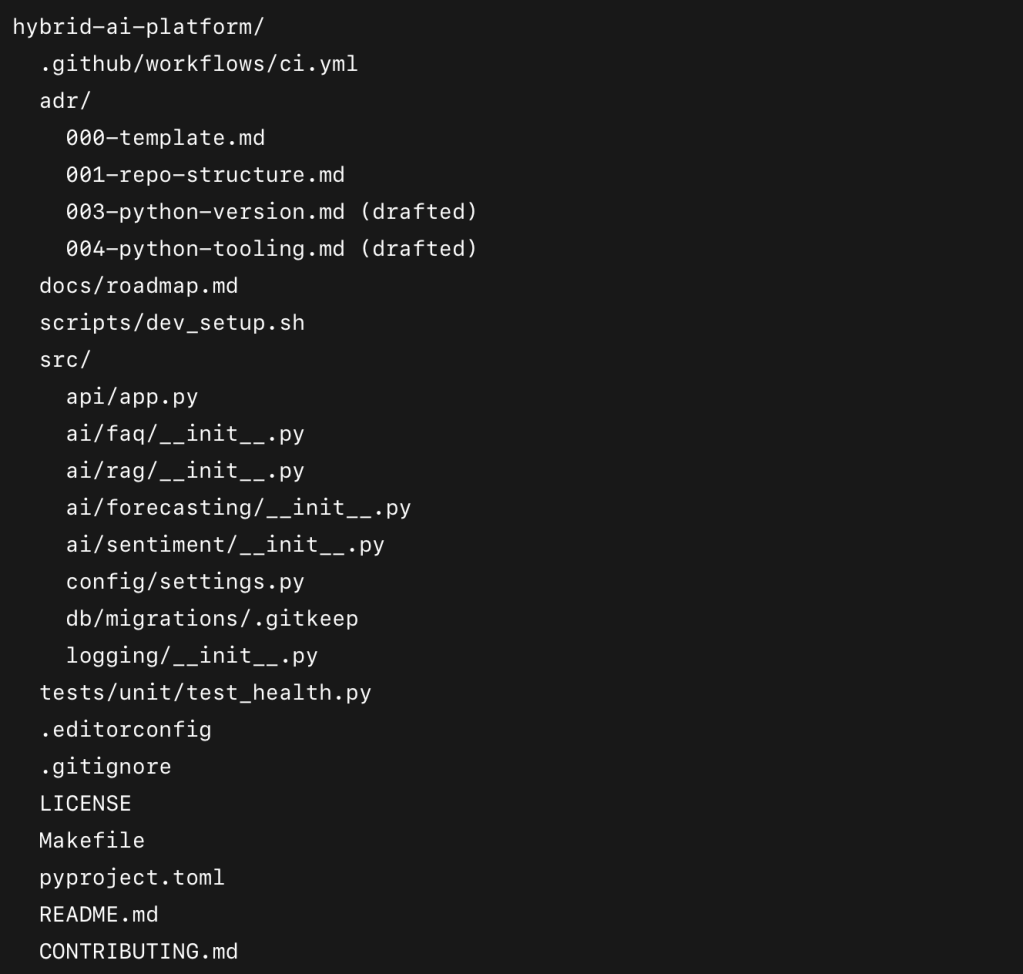
So what does all of this actually do?
The .github Folder
This is where GitHub looks for repository-specific configuration. Inside I created a workflows folder, which is home to my CI/CD pipelines. The key file in there right now is ci.yml.
- Purpose of
ci.yml: it’s my continuous integration workflow. Every time I push code or raise a pull request, this file is executed by GitHub Actions. It checks out my code, installs Python 3.11, caches dependencies, installs my requirements, runs Ruff (linter), Black (formatter check), and finally pytest (tests). - Why it matters: this guarantees that every change I make is tested and formatted properly before it merges into the main code branch.
The adr/ Folder
ADR stands for Architecture Decision Record. Each file in this folder captures one significant decision I’ve made so far:
- 001-repo-structure.md → why I chose a single repository with modular folders (instead of polyrepo or heavy monorepo tooling).
- 003-python-version.md → why I’m using Python 3.11 (broad support + performance).
- 004-python-tooling.md → why I went with venv + pip, Ruff, Black, and pytest.
Why it matters: ADRs are a professional habit. They show not just what decisions I made, but why I made them and what alternatives I considered. In enterprise, this creates traceability and helps future teams understand context.
(At the time of writing I am aware that I somehow jumped from ADR-001 to ADR-003, I’ll fix it later I promise).
The docs/ Folder
At the moment this just has roadmap.md — a placeholder for my plan. This will expand with diagrams and more detail later.
The scripts/ Folder
Contains dev_setup.sh — a placeholder script to help with development setup. Nothing fancy yet, but having a scripts/ folder creates a home for automation as the project grows.
The src/ Folder
This is where the actual application code lives. I’ve organised it by feature:
- api/: contains my FastAPI app. Right now it only has one route (
/health) which returns{"status": "ok"}. This might seem trivial, but it proves my app runs and gives me a health check for later. - ai/: contains subfolders for FAQ bot, RAG, forecasting, and sentiment. These are currently empty
__init__.pyfiles, acting as placeholders for future features. - config/: contains
settings.pywhere environment variables are parsed. At the moment it sets defaults forENVandDEBUG. This will later include my database URL and other secrets. - db/: contains a
migrations/folder. This is where Alembic migrations will live once I set up Postgres. For now it just has a.gitkeepso the empty folder is tracked in Git. - logging/: a placeholder for GDPR-safe logging utilities, to be built later.
The tests/ Folder
Currently I just have tests/unit/test_health.py with one placeholder test:
def test_placeholder():
assert 1 + 1 == 2
It might look silly, but the point is to confirm that pytest runs correctly in CI. It’s my canary test — once this works, I know my pipeline is wired up.
Supporting Files
- .editorconfig: ensures consistent text formatting across editors (line endings, indentation, etc.).
- .gitignore: ignores
venv/,.env, cache folders, and other sh*t I don’t want in git. - LICENSE: MIT license, open-source friendly.
- Makefile: adds shortcuts like
make install,make lint,make test,make run. This saves typing and creates a professional DX (developer experience). - pyproject.toml: my central config file. This defines Python requirements (
>=3.11), and configures Black, Ruff, pytest, and coverage. It means all my tools are aligned and consistent. - README.md: overview of the project and repo structure.
- CONTRIBUTING.md: documents my naming conventions, branching strategy, and commit message rules.
Connecting to GitHub
This was an important step:
- I learned how to connect using SSH, which secures communication between my laptop and GitHub.
- Once set up, I could
git pushandgit pullwithout needing to type my password every time. - I also enabled branch protection rules on
main. This means nothing gets merged without a pull request and a green check from CI. It makes me follow good habits even though I’m working solo.
What I’ve Learned So Far
- Setting up infra like CI/CD, ADRs, and repo structure may feel like “polish” for a solo MVP, but it’s actually foundational. It keeps me organised, avoids future pain, and makes the project recruiter-ready.
- I’ve been surprised how much discipline tools like Ruff and Black enforce. The first time CI failed because my code wasn’t formatted, it felt like a nuisance… but then I realised that’s the whole point. It forces consistency.
- Writing ADRs has been unexpectedly helpful. It forces me to think: “what options do I have, why am I picking one, and what risks am I accepting?” That’s a skill every engineering manager expects.
What’s Next
The next big task is Choose Database & Migrations. This is where things get exciting because I’ll be moving from scaffolding to real functionality.
- I’ll set up a local Postgres database (via Docker).
- I’ll configure Alembic migrations and create my first real table (
bookings). - I’ll update
settings.pyand.env.exampleto wire in the database URL. - And I’ll write ADR 002: Database Choice (told you I’d fix it) to explain why I chose Postgres over SQLite, and why Alembic over raw SQL scripts.
This step will unlock the first Lean MVP feature: Booking CRUD, which forms the backbone of the assistant. From there, I’ll start stitching together the other demo loop components.
What. A. Week.
That’s where I’m at after my first week. It’s been intense, but in a good way. I’ve gone from zero repo to a structured, professional foundation that I think could pass as the starting point of an enterprise project. And now, I’m ready to start building features that actually bring this assistant to life.
Thanks so much for reading – please leave any feedback in the comments, it’s greatly appreciated!



 Deep Learning Diaries
Leave a comment